
Localization Tools for Remote Team Workflows
 12 min read

If your remote team uses one intake form, one term source, fixed file rules, and clear approval steps, localization gets simpler fast. In many setups, translation memory and machine translation can cover 30% to 70% of repeat content, and teams with automated pipelines can cut turnaround from 18 days to 3–5 business days.
Here’s the short version:
- I need one workflow for support, marketing, sales, and admin
- I should set clear owners for requests, translation, review, QA, and sign-off
- I need one place for glossary terms, style rules, status, and current files
- I should sort content by risk level so not everything gets the same review
- I need fixed rules for file names, folders, permissions, and handoffs
- I should set SLA targets like 24 hours for support work and 3–5 business days for planned marketing work
- I need automatic checks for issues like broken tags, placeholders, and character limits before human review
In plain English: this is how I keep requests out of Slack threads, stop version mix-ups, and make sure offshore staff know what to do next without waiting on a manager every time.
What follows is a simple setup for intake, terminology, file control, review paths, and daily handoffs between U.S. managers and offshore teams. This structure is a core component of a successful offshore staffing strategy.
How to Set Up a Localization Workflow
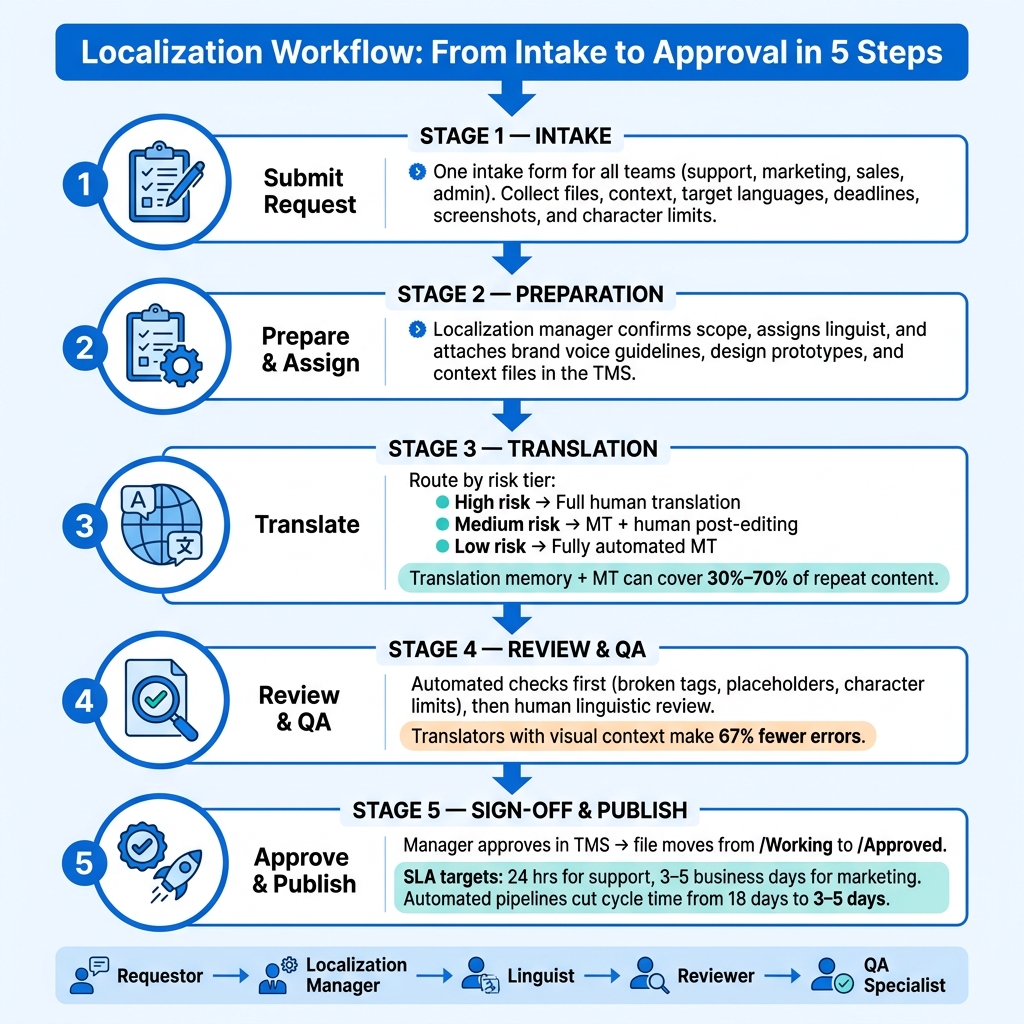
Localization Workflow: From Intake to Approval in 5 Steps
Define Owners, Requests, and Turnaround Targets
With your main tools in place, the next step is simple: decide who owns each request and how fast it needs to move.
Use one intake form for every request. That form should collect files, context, target languages, and deadlines for support macros, campaign copy, sales assets, and admin docs. For higher-stakes content, add screenshots, design prototypes, character limits, and brand voice guidelines before anyone starts work.
Keep the workflow tied to five clear roles:
- Requestor: sets scope and deadlines
- Localization manager: runs the pipeline
- Linguist: adapts the content
- Reviewer: checks accuracy and tone
- QA specialist: catches formatting or functional issues before sign-off
Each role affects the next handoff, so the lines need to be clear from the start.
Set turnaround targets upfront. Use a 24-hour path for urgent support macros and a 3- to 5-business-day cycle for planned marketing work. That way, offshore staff don’t have to guess what comes first, and managers don’t have to chase status updates. Support, marketing, sales, and admin should all come through the same intake path every time.
Once ownership is clear, put terminology and status in one place.
Create One Source of Truth for Terminology and Status
Use the TMS as the single source of truth for the glossary, style guide, translation memory, and status tracking. If offshore staff need to check an approved term or see which version is current, there should be one place to look – not five.
Translation memory and machine translation can handle 30% to 70% of content volume on established projects. That cuts turnaround time and lowers rework. But this only works if the TMS stays current. If glossary entries drift or status fields go stale, teams fall back into the same scattered habits the system was built to fix.
After that, send each content type through the level of review it needs.
Standardize Handoff Rules by Work Type
Route content based on risk level, not one default path for everything. A tiered model keeps work moving while still giving closer review where it counts.
Use one workflow path for each risk tier:
| Content Type | Risk Level | Workflow Path |
|---|---|---|
| Legal docs, brand copy, homepage copy, UI strings | High | Full human translation + bilingual review + linguistic QA |
| Marketing assets, support docs | Medium | Machine translation + human post-editing |
| Internal tools, changelogs, FAQs | Low | Fully automated machine translation + auto-QA |
This helps offshore staff keep moving without sitting around for manager approval they don’t need. Campaign copy should always be packaged before work starts, with brand voice guidelines, screenshots, design prototypes, and character limits included. Add screenshots, design files, brand voice notes, and character limits before work starts to cut revisions.
sbb-itb-7512dae
How to Organize Files, Assets, and Access
Use Consistent File Naming and Version Control
Once your terms and status labels live in one place, the next job is simple: lock down file names and versions.
Every file should follow the same pattern: [Team][Content-Type][Market/Language][Version][Date].
Example: Support_Macro_ES-MX_v2_07-02-2026
That format makes life easier for everyone. A manager can spot the current version in seconds. Offshore staff can see right away which file they should use. When support macros, campaign copy, sales assets, and admin docs all follow the same naming pattern, there’s no guesswork.
Separate Source Files, Working Files, and Approved Outputs
Set up three folders: /Source, /Working, and /Approved.
Each one has a clear job:
/Sourcestores the original, untouched master files/Workingstores anything still in progress, including drafts, in-progress translations, and design edits/Approvedstores only final assets that are ready to publish
This setup keeps the process clean. Offshore staff work only in /Working. Managers publish only from /Approved.
The rule is straightforward: nothing moves to /Approved without manager sign-off, and nothing in /Source gets edited directly.
Set Permission Levels for Managers and Offshore Staff
Each role should get only the access it needs. No more, no less.
| Role | Access Level | Allowed Actions |
|---|---|---|
| Localization Manager | Admin / Owner | Full edit, upload, move files, final sign-off |
| Offshore Translator | Contributor | Edit and upload to /Working only |
| Reviewer | Reviewer | Comment and approve specific strings or files |
Offshore staff should be able to upload finished translations and leave comments on their own. They shouldn’t need a manager to open things up every time. But they also should not be able to move files into /Approved or overwrite master source files.
With access set, the next step is moving each item through translation, review, and sign-off.
How to Route Work Through Review and Approval
Move Work From Request to Translation, Review, and Sign-Off
Once files are in /Working and permissions are set, move them through review the same way every time. Keep the path simple and fixed: intake, preparation, translation, review, and sign-off.
Don’t send work to the next stage until the current one is done. That starts with the brief. If the brief is missing details or QA checks haven’t passed, the file stays put. Each handoff should be based on a clear rule about what must be finished first.
Nothing should go into translation until the brief is complete and the content is ready for translation. In plain terms, target languages need to be confirmed, and the request needs to include the context reviewers rely on, such as screenshots, character limits, and brand or audience guidance. Translators who can see the actual UI or layout make 67% fewer errors than those working from raw text alone.
After translation, move the file to review only when automated quality checks pass. This includes issues like broken placeholders, tag mismatches, or character limit violations. Catch those mechanical problems early, before a person reviews the file, so the reviewer can focus on tone and accuracy instead of cleaning up preventable mistakes.
Sign-off happens after the reviewer approves in the TMS and QA clears. At that point, move files from /Working to /Approved.
Clarify Manager Approval Versus Offshore Staff Review
Offshore staff handle linguistic review for internal docs, help articles, and support macros.
Managers approve customer-facing or high-risk content, including pricing, legal disclaimers, executive updates, and campaign copy.
Use a Workflow Table for Roles and Approval Stages
The table below shows who reviews each content type and who gives final approval, so there’s no confusion about ownership.
| Content Type | Primary Task | Review Responsibility | Final Approver |
|---|---|---|---|
| Support (Macros/Help Docs) | MT + Post-edit | Offshore Linguist / Peer Review | Support Lead |
| Marketing (Campaigns) | Human Translation / Transcreation | In-Country SME / Brand Manager | Marketing Manager |
| Sales (Pricing/Deals) | Human Translation | Manager / Legal Stakeholder | Regional Sales Director |
| Admin (Internal/Legal) | Human Translation | Legal / Compliance Specialist | Localization Manager |
Use the same approval path for support, marketing, sales, and admin so handoffs stay predictable across teams.
How to Apply the Workflow Across Teams and Hand Off Work
Support, Marketing, Sales, and Admin Use Cases
Once roles and approval stages are set, apply the same workflow by content type. The main thing that shifts from team to team is how much review each item needs and how fast it needs to move. The core process stays the same.
Support usually handles the biggest volume and works on the shortest timelines. Ticket macros and help center articles are low-touch content, so they can move through automated translation with automated QA. The target for support is 24 hours.
Marketing needs more hands-on review. Landing pages, email sequences, and ad copy should go through human post-editing, then a brand review before sign-off. The target for marketing is 5 days.
Sales content, like proposals and RFPs, carries pricing details and deal-specific wording. That means it needs a domain or legal review before the final manager sign-off.
Admin content, such as internal SOPs, policy updates, and compliance text, is low-touch. It can move through AI translation with light human review.
| Content Type | Review Depth | Turnaround Target |
|---|---|---|
| Support Macros / Help Docs | Low-touch | 24 hours |
| Marketing Landing Pages / Email | High-touch | 5 business days |
| Sales Proposals / RFPs | High-touch | Varies by deal |
| Internal SOPs / Policy Docs | Low-touch | 24–48 hours |
After each team is on the right review path, the next job is to lock in daily and weekly handoffs.
Daily and Weekly Handoff Points Between Managers and Offshore Staff
Use a fixed handoff cadence. Managers assign work at the start of the North American day, and offshore staff send back updates before their shift ends.
At the start of each week, managers should set priorities, confirm target languages, and attach context files to each request in the TMS. That includes screenshots, character limits, and brand notes. Offshore staff then pick up tasks in priority order and post written progress updates before the end of their shift.
Set escalation triggers ahead of time. If a translation misses its SLA window – 48 hours for UI text and 5 days for marketing copy – the system should automatically send a Slack alert or create a Jira ticket for the manager. Offshore staff shouldn’t have to stop and wonder if a blocker needs attention. The workflow should make that call for them.
Conclusion: Build a Repeatable Localization Process That Scales
A localization workflow that scales follows the same model used throughout this guide: intake, translation, review, approval, and handoff. The key is clear ownership at each stage. Get that right, and remote teams can ship faster with fewer errors, even as the number of languages grows.
Automated localization pipelines can cut cycle times from 18 days to 3–5 days. That kind of speed comes from process, not from adding more people.
Teams run into trouble when they try to fix staffing without fixing the process first.
So use that speed the right way: standardize the workflow instead of piling on manual checks. Lock your glossary, give each approval stage one owner, and document your handoff rules. Once those pieces are set, adding another language doesn’t change how the work gets done – it just moves through the same pipeline.
Talently can source and vet South African offshore staff who fit North American work hours.
FAQs
How do I choose the right review level for each content type?
Match the review level to the content’s risk.
Use human review and tight quality checks for high-risk content, like legal documents or brand-critical copy. In those cases, a small mistake can cause a big headache, so it makes sense to keep people closely involved.
For medium-risk content, a hybrid setup usually works best. AI handles most of the draft, and a person steps in to review weaker sections or anything that feels off. That gives you a good balance between speed and control.
Low-risk, high-volume content can often run with full automation. Just make sure the workflow is clear from the start so your remote team follows the same process every time.
What should my intake form include for localization requests?
Include the basics your localization team needs: the source material type, target language, and priority tier.
Then give them the context that saves time and cuts back-and-forth. Add visual context like screenshots or links, note any character limits, and include developer notes for terms that could mean more than one thing.
It also helps to share glossary or style guide links, plus the file format or codebase module where the text lives. That way, translators can see how the copy fits into the product and move through the work with fewer guesses.
Which localization tasks can offshore staff handle on their own?
Offshore staff can take care of several parts of the localization workflow on their own, including:
- file handling for JSON, XML, or PO files
- monitoring CI/CD pipelines
- translating help docs, marketing assets, and email sequences
- using translation memory and glossaries for consistency
- tracking status and fixing formatting issues
Related Blog Posts
Ready to build your dream team?
Book a free consultation and get your first candidate shortlist within 48 hours.
No upfront fee • Only pay if you hire