
GDPR, POPIA, PIPEDA: Time Tracking Compliance Guide
 13 min read
Time tracking can turn into a privacy problem fast. If your tool logs hours, location, screenshots, or “idle time,” you may fall under GDPR, POPIA, PIPEDA, or more than one at once. And the cost of getting it wrong can be high: GDPR fines can reach €20 million or 4% of global annual revenue.
If I had to boil this down, I’d say this: track only what you need, write down why you need it, tell workers what’s being collected, lock down access, and delete data on a fixed schedule. For most SMBs, low-risk setup means clock-in/out times, project IDs, and total hours worked. Once a tool starts logging keystrokes, nonstop screenshots, webcam footage, or GPS for no clear reason, security risks and compliance concerns increase.
Here’s the short version:
- Personal data is broader than names and emails. It can include work patterns, location, activity logs, and “active vs. idle” signals tied to a person.
- Worker location often decides which law applies. A U.S. company may still need to follow EU, South African, or Canadian rules. This is particularly relevant when managing offshore staffing in South Africa or other global regions.
- Consent is usually weak in employment. For routine tracking, companies often rely on payroll, contract, or legitimate interest grounds instead.
- Purpose creep is a problem. If you collect data for payroll or safety, you usually can’t later use it for discipline unless that use was disclosed.
- High-surveillance features need extra care. In some cases, a DPIA or PIA should happen before launch.
- Cross-border transfers need contracts. Vendor DPAs, SCCs, and similar transfer terms matter when employee data moves between countries.
- Employees have rights. Access, correction, objection, and complaint handling should run through one clear internal process, often within 30 days.
Quick comparison:
| Law | Main trigger | What matters most |
|---|---|---|
| GDPR | You process data of workers in the EU/EEA/UK | Lawful basis, proportionality, transfer rules |
| POPIA | You process worker data in South Africa | Similar protection, Information Officer, clear purpose |
| PIPEDA | You process worker data in Canada | Reasonable purpose, least intrusive option, vendor contracts |
I’d treat time tracking as a privacy project, not just a payroll setting. The safest path is simple: keep collection narrow, keep notices clear, and keep retention short.
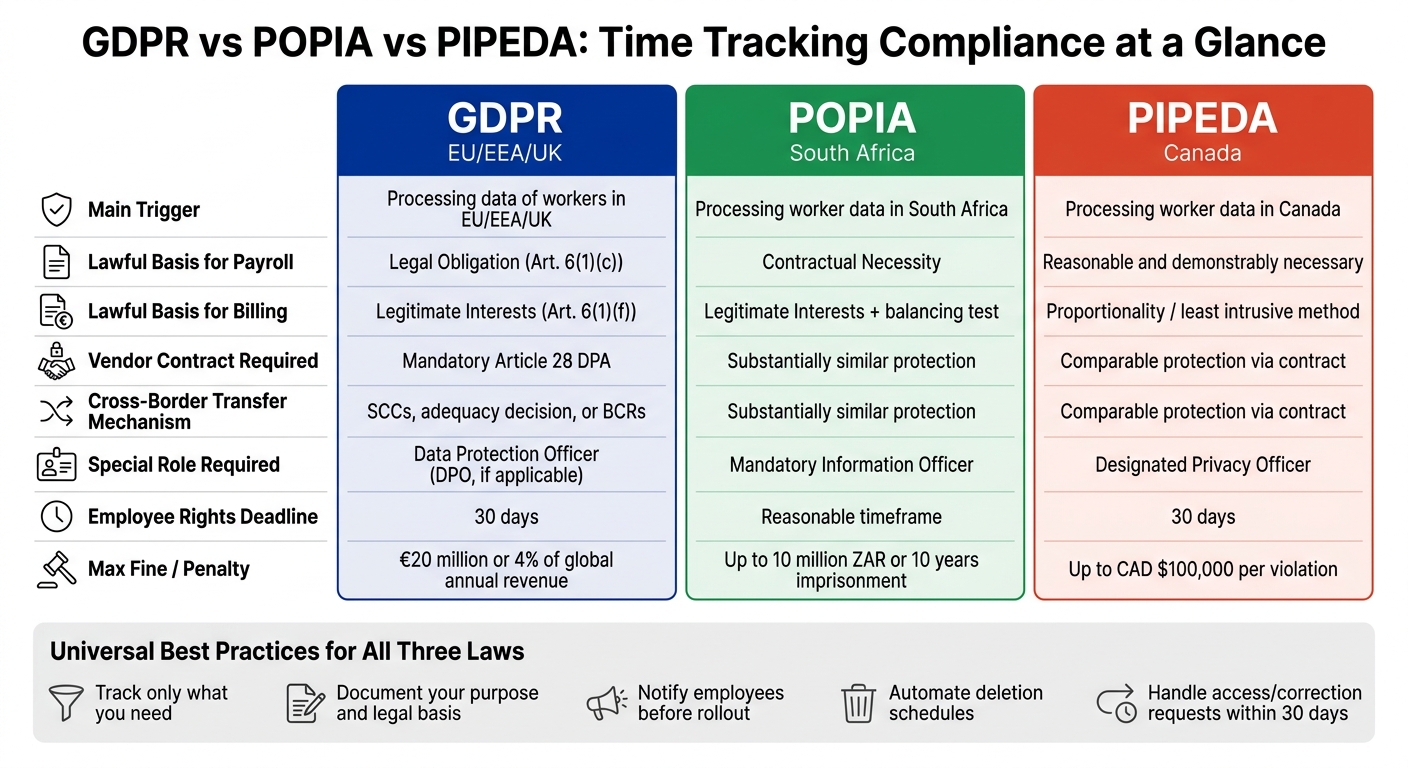
GDPR vs POPIA vs PIPEDA: Time Tracking Compliance at a Glance
Lawful basis and purpose: documenting why you track time
Once you know what the tool collects, the next step is simple: write down why each data type is being collected. If there’s no clear, written purpose, there’s no solid legal basis to point to later. And that purpose should shape every tracking feature you switch on.
GDPR, POPIA, and PIPEDA rules for payroll, billing, and productivity tracking
Each law uses different terms, but the day-to-day logic is much the same: the reason for tracking has to be specific, proportionate, and tied to an actual business need.
| Use Case | GDPR Basis | POPIA Basis | PIPEDA Standard |
|---|---|---|---|
| Payroll, attendance, and overtime records | Legal Obligation (Art. 6(1)(c)) | Contractual Necessity | Reasonable and demonstrably necessary |
| Client billing & project costing | Legitimate Interests (Art. 6(1)(f)) | Legitimate interests, after a balancing test | Reasonable and demonstrably necessary / proportionality |
| Team-level capacity planning from aggregated data | Legitimate Interests (Art. 6(1)(f)) | Legitimate interests, after a balancing test | Least intrusive method |
For GDPR and POPIA, Legitimate Interests is not something you can just claim and move on from. You need a written balancing test that shows the business need outweighs the employee’s privacy interests. Under PIPEDA, the bar is also clear: monitoring must be demonstrably necessary, likely effective, proportionate to the benefit, and the least intrusive option available.
Why employee consent is usually not enough on its own
In employment, consent is often shaky ground. Why? Because saying “no” may not feel like a real option. If someone thinks refusal could affect their job, that consent is not freely given. There’s also a plain business problem here: employees can withdraw consent at any time, which makes consent a poor sole basis for routine tracking.
Consent still has a place, but usually for non-routine and high-intrusion activities, such as biometric attendance systems or AI-based performance analytics. For routine timesheets, project hours, and overtime logs, use Legal Obligation, Contractual Necessity, or Legitimate Interests instead. If a feature feels intrusive, the answer is usually less data collection, not broader consent wording.
For systematic or high-surveillance monitoring, complete a DPIA under GDPR or a PIA under PIPEDA/Quebec Law 25 before launch.
How to write clear, defensible purposes for time tracking
The biggest mistake here is being vague.
Before turning on any tracking feature, write the business reason in plain English. Say “verify overtime for payroll” or “calculate client billables.” Don’t say “productivity monitoring” or “we may need it someday.” That kind of wording is too loose to defend.
This matters because purpose creep is a known enforcement risk. In a 2024 Ontario arbitration case, a municipal employer used GPS data – first collected for worker safety – to discipline employees for attendance issues. The arbitrator ruled that this went beyond what had been disclosed to employees, and the disciplinary action was struck down. Data collected for one purpose cannot be reused for another unless that second use was disclosed at the time of collection.
In short, your purpose statement is not just paperwork. It should decide what you collect, what you don’t collect, and how far the tracking goes in the next section.
sbb-itb-7512dae
Privacy-by-design setup: collect less, secure it, and delete it on schedule
Your purpose statement from the previous step should shape every setting you turn on. If the purpose is payroll or billing, keep the setup that narrow. Across all three laws, the basic rule is the same: collect only what you need, limit who can see it, and delete it on a set schedule.
Low-risk tool settings for remote teams
Start with the few features your purpose calls for, and leave the rest off. For offshore staffing and remote teams, that usually means tracking only:
- clock-in and clock-out times
- project or task IDs
- total hours worked
Once you go past that, risk climbs fast. Keystroke logging, nonstop screenshots, and webcam monitoring are high-risk and often out of proportion for general productivity tracking. App and URL tracking should stay off by default. Turn it on only when there’s a clear business need and that need is written down.
Use work-hours-only tracking so data collection stops when a shift ends. Pair that with role-based access control (RBAC) so only the right people can view the data.
Retention rules for timesheets, screenshots, and activity logs
Not all time-tracking data gets old at the same pace, so it shouldn’t all sit in storage for the same amount of time. Keep payroll and attendance records only as long as local payroll and labor law requires. Your retention schedule should match the purpose you documented, not whatever archive setting the tool ships with.
Detailed activity logs and screenshots should go much sooner. A 90-day default is a safe starting point.
Set deletion rules inside the tool so the process runs on its own, instead of relying on manual cleanup. If you need data for trend analysis, export aggregated reports and strip out direct identifiers before you use them again.
Screenshots need extra care. If you enable them, blur them by default and delete them on a short schedule. French regulators have also imposed €40,000 in fines against an unnamed company for excessive monitoring involving constant screenshots and video surveillance, citing a violation of proportionality requirements.
Short retention helps, but it isn’t enough on its own. Access has to stay tightly limited too.
Comparison table: low-intrusion settings vs. high-surveillance settings
Use the table below to compare low-intrusion defaults with high-surveillance features.
| Feature Type | Business Use | Risk Level | Recommended Default |
|---|---|---|---|
| Clock-in/out timestamps | Payroll & attendance | Low | Enabled |
| Project/task logging | Client billing | Low | Enabled |
| App/URL tracking | Productivity analysis | Medium | Disabled by default |
| Periodic screenshots | Activity verification | High | Disabled or blurred by default |
| Keystroke logging | Surveillance / DLP | Very High | Disabled |
| Continuous webcam/GPS | Surveillance | Very High | Disabled |
The pattern is pretty clear: the farther a feature gets from a direct business need, the harder it is to justify. If you’re unsure, keep the default off.
Transparency, employee rights, and cross-border data transfers
After setting collection limits and retention periods, make the tracking terms visible to employees. Two pieces matter here: the employee notice and the request process. And that notice should line up with the exact features you turned on.
What your monitoring notice and internal policy must include
Your monitoring notice doesn’t have to read like a contract. But it does need to be specific. Under GDPR Articles 12–14, POPIA, and PIPEDA, employees must get clear, plain-language disclosure about the tracking.
At a minimum, the notice should explain:
- Who controls the data – the employer or another responsible controller
- What data is tracked – clock-in/out times, project IDs, screenshots (if enabled)
- Why it’s tracked – payroll processing, client billing, or a specific business need
- The legal basis for each tracking purpose
- Who can access the data – HR, Finance, and approved vendors/processors
- How long it’s kept – set timeframes tied to each data type
- What rights employees have – access, correction, objection, and how to use those rights
Ontario employers with 25 or more employees must have a written electronic monitoring policy. Quebec also requires a PIA before launch, plus French-language access for policies and interfaces.
Once employees can see what is being tracked, requests should go through one internal owner.
How to handle access, correction, objection, and complaint requests
The notice tells employees what happens. The rights workflow tells them how to push back.
Employees across the EU, Canada, and South Africa can ask to access, correct, or object to time-tracking data. Response timelines are usually 30 days under GDPR, PIPEDA, and Quebec’s Law 25, while POPIA calls for a reasonable deadline.
The simplest way to manage this is one internal workflow instead of separate tracks for each law. Put HR or a designated Privacy Officer in charge. POPIA goes a step further and requires a formally appointed Information Officer for South African operations.
When a request comes in:
- log it right away
- pull the relevant export from the time-tracking tool
- respond in writing within the deadline that applies
If a manager disputes an employee’s correction request, send it up to the Privacy Officer instead of letting the manager settle it alone.
Document each request and how it was resolved. If a complaint lands with a regulator, that record is your first line of defense.
When data moves across borders, your contracts and transfer path need to match what the notice says.
Cross-border transfers, vendor contracts, and South African remote teams
When time-tracking data moves between countries, each transfer needs a lawful path.
Under GDPR, any transfer of EU/EEA resident data outside the EEA requires Standard Contractual Clauses (SCCs), an adequacy decision, or Binding Corporate Rules (BCRs). POPIA requires the receiving country or organization to provide protection “substantially similar” to POPIA’s standards. PIPEDA requires a “comparable level of protection” through a contract with the third party.
For every time-tracking vendor you use, that means a signed Data Processing Agreement (DPA). Under GDPR Article 28, that step is mandatory.
The table below sums up the main transfer and vendor rules:
| Requirement | GDPR (EU/EEA) | POPIA (South Africa) | PIPEDA (Canada) |
|---|---|---|---|
| Transfer mechanism | SCCs, adequacy decision, or BCRs | Substantially similar protection | Comparable protection via contract |
| Vendor contract | Mandatory Article 28 DPA | Organization remains accountable | Third-party protection required |
| Subprocessor controls | Published list; prior notice of changes | Accountability stays with the organization | Contractual obligation to downstream parties |
| Special role required | Data Protection Officer (DPO, if applicable) | Mandatory Information Officer | Designated Privacy Officer |
Offshore teams add one more step: figure out who acts as controller before the data moves. For South African remote teams hired through Talently, map which party controls employment, payroll, and time data before choosing a transfer mechanism.
Conclusion: A compliance checklist for remote time tracking
Use the rules above as your rollout checklist for any time-tracking tool. Before you switch anything on, map your data flows. You need to know where employee data sits, who can get to it, and which cloud servers it moves through. Then document the purpose and legal basis for each tracking type. Name one person to own privacy. After the legal pieces are set, configure the tool for minimum collection.
That means turning off keystroke logging, nonstop screenshots, and webcam features unless you can show a clear, proportionate business need. Sign a Data Processing Agreement with every vendor before any data moves. Set automated deletion schedules tied to the retention period required by local tax and labor law. Publish your employee monitoring notice before rollout. And put a simple internal process in place so access, correction, and objection requests are handled within 30 days.
Here’s the final checklist:
| Category | Action |
|---|---|
| Organizational | Appoint a Privacy Officer; register an Information Officer in South Africa |
| Legal | Document purpose and legal basis; complete any required assessment; sign a vendor DPA |
| Transparency | Issue plain-language monitoring notices |
| Technical | Disable keystroke/screenshot logging; enable encryption and MFA |
| Retention | Automate deletion on a fixed schedule tied to the retention period required by local tax and labor law |
| Rights | Set up a 30-day process for access, correction, and objection requests |
Finally, treat this as a living process, not a one-time setup. Hitting the 25-employee mark in Ontario, for example, triggers a written electronic monitoring policy by law. That kind of shift should lead to a full policy review. Review your setup each year, and also after adding a new country, vendor, or monitoring feature.
FAQs
Which law applies if my company is in the U.S. but my employees are abroad?
If your U.S. company has employees in other countries, you may need to follow both U.S. law and the privacy rules in the countries where those employees live.
For example, PIPEDA may apply to U.S. companies with employees in Canada, and POPIA may apply when employee data is processed in South Africa. That means your time tracking practices need to match each country’s rules around transparency, consent, and data protection.
When do I need a DPIA or privacy impact assessment for time tracking?
A DPIA helps you spot and cut privacy risks in a time tracking project. You’ll usually need one when your tracking could put employees at higher risk. It also helps show that the data you collect is necessary and proportionate.
That often applies to more intrusive practices, such as screenshots, keystroke logging, nonstop activity monitoring, or employee profiling. If you operate in the EU or employ EU residents, a DPIA also supports GDPR compliance.
What time-tracking features are too intrusive to justify?
Under GDPR, PIPEDA, and POPIA, features cross the line when they collect more data than a company strictly needs for a legitimate business purpose.
That usually includes things like:
- keystroke logging
- screenshots or video capture
- audio monitoring
- private email or chat logging
- mouse tracking
- GPS tracking
- collecting health, religious, or political information
These practices often fail tests of necessity and proportionality.
Related Blog Posts
Ready to build your dream team?
Book a free consultation and get your first candidate shortlist within 48 hours.
No upfront fee • Only pay if you hire