
Best Practices for Data Privacy in Offshore Hiring
 11 min read

Offshore hiring can save money, but one bad privacy setup can cost a U.S. business $9.36 million on average. If I hire offshore staff, I need to lock down four things from day one: contracts, access, devices, and reviews.
Here’s the short version:
- Put privacy rules in the contract before work starts
- Give each person only the access they need
- Use locked-down devices and approved work tools
- Train staff on phishing, file sharing, and incident reporting
- Review logins monthly, access quarterly, and response plans yearly
A few numbers stand out:
- U.S. data breaches average $9.36 million
- The global average is $4.88 million
- 23% of breaches involve offshore teams or outside vendors
- Breaches take about 258 days to find and contain
The main point: if I wait until after onboarding to think about privacy, I’m already late. The safest approach is simple: set the rules early, limit access, secure the device, and check the setup on a set schedule.
This article breaks down the steps in plain English so I can put those controls in place before the first login.
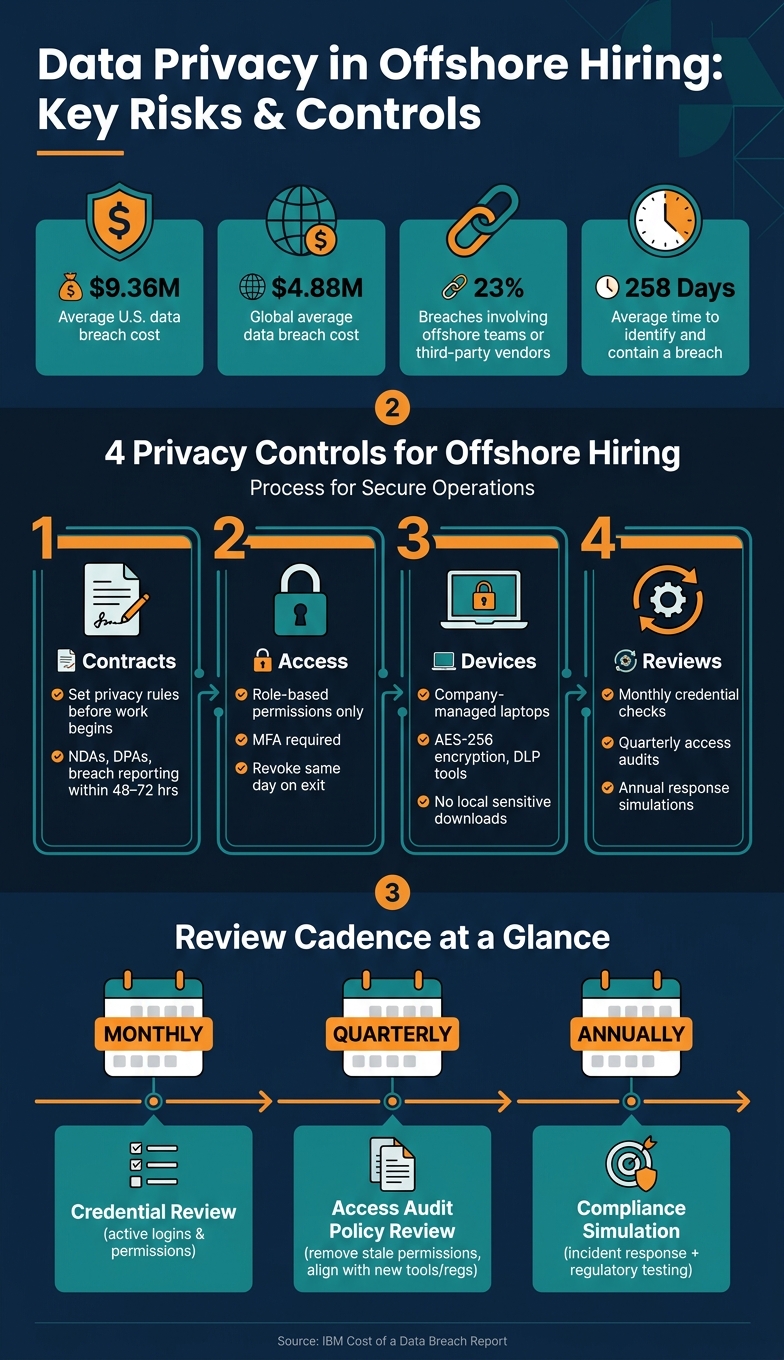
Data Privacy Risks & Controls in Offshore Hiring
1. Set privacy requirements in contracts before work begins
Before anyone gets a first login, the contract should spell out how privacy will be handled. That means confidentiality, data handling, and offboarding all need to be clear from day one.
Use NDAs, data protection clauses, and role-based rules
Each offshore hire should sign an individual NDA before they can access any company system. That NDA should also make it clear that confidentiality duties continue after employment ends. Add a data-use clause too, and when needed, include a DPA, BAA, or SCCs.
The contract should also ban personal email for work files and limit the use of unapproved apps. For system access, require company-approved SSO, MFA, and VPN or Zero Trust access.
Access rules should be tied to the role. In plain terms, each person should only be able to reach the data and systems they need to do their job.
Define breach reporting and offboarding obligations
Set a 48- to 72-hour window for reporting suspected incidents. That matters because organizations take an average of 258 days to identify and contain a data breach, and slow escalation can make a bad situation worse.
Offboarding needs the same level of clarity. Contracts should require immediate removal of all access at termination, along with the return or certified destruction of company data.
How a hiring partner can support secure documentation
A hiring partner like Talently can help collect signed agreements and keep onboarding records in order.
Once the contract is set, the next move is simple: limit each hire’s access to only what the role calls for.
sbb-itb-7512dae
2. Limit each offshore hire’s access to only what their role requires
Contracts spell out the rules. Access control is what puts those rules into practice.
From day one, give each offshore hire only the access tied to their role, following best practices for managing offshore teams. A VA doesn’t need CRM admin rights. A designer doesn’t need payroll access. The more access someone has beyond their job, the more privacy risk you take on.
Set role-based permissions from day one
Role-Based Access Control (RBAC) assigns permissions based on job function instead of handing out broad access just to move onboarding along.
That matters because broad access tends to stick around. People change tasks, join short-term projects, or move between teams, and old permissions often stay in place. That’s how access creep happens.
Use time-limited access for short projects. When the project ends, that access should expire without anyone having to chase it down.
Require MFA, password standards, and centralized credential control
Every system login should require multi-factor authentication (MFA). No exceptions.
Keep credentials under one roof with a single SSO system like Okta, Azure AD, or Google Workspace. That gives IT one place to remove access when needed, instead of hopping between tools and hoping nothing gets missed.
It’s also smart to pair SSO with a password manager like 1Password or LastPass. That way, passwords aren’t passed around in email or chat, which is where small mistakes can turn into big problems.
Remove access immediately when roles change or end
Limiting access is the first step. After that, lock down the devices and login methods used to reach company systems.
If a role changes or ends, revoke access the same day. Email, SaaS, cloud, and VPN access should all be shut off at once. Don’t let one account stay live while the rest are turned off.
Review access any time responsibilities change, and make sure permissions still match the person’s current role.
3. Secure devices, onboarding, and data handling from day one
Secure onboarding is a privacy control. The device someone uses, how their account gets set up, and where files live all shape the starting point of the engagement. Once you limit access, you need the same level of control over the device and the workspace.
Use approved devices, protected networks, and standard tools
Start with company-managed laptops. Set them up with full-disk encryption, remote wipe, and USB controls.
If BYOD is allowed, set a clear floor for every device: endpoint protection, screen locks, automatic updates, and VPN or ZTNA for every session. Keep work inside approved collaboration and file-sharing tools only.
Protect data in transit and at rest
Once the device is under control, the next step is to limit where sensitive files can go.
Encrypt data in transit and at rest, and use AES-256 for stored data. VDI or cloud workspaces help keep sensitive data in the cloud instead of on local devices. For sensitive data, block local downloads, copying, and storage on personal devices. DLP tools on platforms like Slack and email add an automated check that can stop sensitive data before it leaves the organization.
Comparison table: policy, technical, and operational safeguards
These safeguards work best as a stack: policy, tech, and operations.
| Safeguard Category | Focus | Practical Examples |
|---|---|---|
| Policy | Legal and behavioral rules | NDAs, data handling policies, IP assignment clauses, BYOD requirements |
| Technical | Software and hardware controls | Full-disk encryption, VPN/Zero Trust, AES-256 encryption, VDI, SSO, USB controls |
| Operational | Human-led processes | Background checks, device inventory, security training, incident response drills, onboarding/offboarding checklists |
Policy sets the rules. Technical controls enforce them. Operations keep them current.
4. Train offshore staff and review privacy controls on a set schedule
Once contracts, access, and devices are set up, training and audits are what keep those controls working. That matters after onboarding, when day-to-day habits start to take over. Without regular follow-through, even strong rules can fall apart. People miss phishing emails. They forget incident reporting. And when that happens, even a well-built setup starts to crack.
That’s why training can’t be a one-and-done onboarding task. It needs to be a recurring part of how you protect data over time.
Deliver practical privacy and security training
Start on day one, and make the training fit the person’s role. Remote teams need plain rules for email, chat, file sharing, and incident escalation. A developer with access to production systems should not get the same guidance as an accountant handling financial records. When risks vary by role, generic training falls short.
Day-one training should show staff how to use the controls already in place. Quarterly refreshers can be live or recorded, but they should cover the same core risks: phishing, data handling, device security, password hygiene, and incident reporting.
There’s another point that often gets missed: reporting behavior. In some offshore settings, team members may hold back from escalating a concern to a manager out of respect for authority. That delay can make a breach worse. So spell it out. Reporting suspicious activity should be safe, expected, and open to everyone, no matter their seniority.
Security should enable collaboration, not slow it down. This balance is a key part of navigating offshore staffing successfully.
Track completion rates, and follow up right away if anyone misses training.
Run regular audits of access, logs, devices, and vendors
Training cuts down on mistakes. Audits show whether the controls still work. A simple review cadence can catch issues early, before they turn into a breach.
| Review Type | Frequency | Focus Areas |
|---|---|---|
| Credential Review | Monthly | Reviewing active logins and individual permissions |
| Access Audit | Quarterly | Checking for and removing stale permissions |
| Policy Review | Quarterly | Align policies with new tools, roles, and regulations |
| Compliance Simulation | Annually | Full-scale incident response and regulatory compliance testing |
Monthly credential reviews help spot active logins and permissions that no longer fit someone’s role. Quarterly access audits remove stale permissions. And an annual incident response simulation makes sure your offshore team knows how to communicate across time zones if something goes wrong.
Include endpoint checks in the same review cycle. Ask offshore partners for current security documentation every 12 months. Use both scheduled reviews and live monitoring to catch misuse early.
“Security isn’t a one-time check, it’s an ongoing effort. Offshoring providers and their clients must continuously assess and evolve their cyber hygiene strategies.” – 365 Core Talent
Conclusion: Build privacy into every stage of offshore hiring
Data privacy in offshore hiring needs to be part of the process from day one. That means from the contract stage to offboarding, not after something goes wrong. When privacy controls are built into day-to-day work, they’re far more likely to stick.
Weak controls come with a steep price tag. For U.S. companies, the average data breach costs $9.36 million – almost double the global average – and about 23% of breaches involve international teams or third-party vendors.
If you work with Talently, its sourcing, vetting, and payroll support can give you a stronger starting point for your own access, device, and staff training controls.
Key takeaways for small and mid-sized businesses
In practice, this comes down to five controls. For SMBs, the simplest path is to set them up before anyone logs in for the first time.
- Document privacy requirements before work begins.
- Grant only role-based access and revoke it right away when roles change or end.
- Use company-managed devices and block sensitive BYOD.
- Train staff on phishing, social engineering, and incident reporting.
- Review credentials monthly, access quarterly, and response plans annually.
FAQs
What data should offshore hires never access?
Offshore hires should get access only to the information they need to do their jobs. That’s the idea behind least privilege: if a system, file, or dataset isn’t tied to someone’s work, they shouldn’t be able to see it.
A simple example makes this clear. Customer support shouldn’t be able to open payroll files. Administrative staff shouldn’t have access to bank credentials or board reports. Keeping access tight in this way helps limit risk if an account is misused or a login falls into the wrong hands.
Role-based access and zero-trust models add another layer of control. They help protect sensitive intellectual property and customer records by making sure people can reach only what their role calls for – nothing more.
Can I allow BYOD for offshore staff?
BYOD for offshore staff can open the door to serious security risks. The reason is simple: you’re relying on home networks and personal devices that your team hasn’t audited. If you decide to allow it, you need tight controls in place to protect company data.
Require:
- a company-approved VPN
- multi-factor authentication
- current antivirus
- firewalls
- security patches
- no local storage of sensitive data
- regular endpoint audits for compliance
How often should I review offshore access?
Review offshore access to your systems at least once every quarter. That gives you a regular chance to check that each person still has the right level of access for their current role and to remove old or unneeded permissions before they turn into security problems.
Between those reviews, watch access activity in real time. If a contractor leaves or their role changes, revoke their credentials right away.
Related Blog Posts
Ready to build your dream team?
Book a free consultation and get your first candidate shortlist within 48 hours.
No upfront fee • Only pay if you hire