
Managing Remote Teams Across Time Zones
 12 min read

Managing remote teams across time zones is challenging but achievable with the right strategies. Here’s what you need to know:
- Time Zone Mapping: Use tools like Time Zone Grid or Team Timezone to visualize team availability and identify overlap hours.
- Communication Guidelines: Establish clear collaboration technology, response times, and prioritize asynchronous communication (e.g., Loom, Slack).
- Fair Scheduling: Rotate meeting times to avoid burdening specific team members and provide recordings for those who can’t attend. While beneficial, be aware of the potential drawbacks of offshore staffing like extreme time differences.
- Engagement Practices: Schedule regular one-on-ones, document outcomes, and recognize contributions asynchronously.
- Simplify Deadlines: Set a default company time zone and always specify deadlines in both default and local time zones.
Managing Remote Teams Across Time Zones Without Burning People Out With Dmitrii Kustov
sbb-itb-7512dae
Checklist for Mapping and Visualizing Time Zones
Managing remote teams effectively starts with understanding where your team members are located and when they’re available. Without a clear visual reference, you risk wasting time calculating overlaps or, worse, scheduling meetings when half the team is asleep. Having this clarity upfront ensures smoother coordination.
Create a Time Zone Map
Use visual tools to map out your team’s locations. Platforms like Time Zone Grid and Timezoners provide color-coded grids that highlight “Golden Hours” – those critical one- to three-hour windows where work schedules overlap across regions. Typically, green indicates working hours, while red shows sleeping hours.
For teams scattered across continents, tools like CityLabMap offer a real-time view of sunlight distribution, making it easy to see who’s in daytime versus nighttime. Clicking on specific locations automatically handles time zone calculations. Another great option is Team Timezone, which supports over 400 time zones globally, adjusts for Daylight Saving Time, and doesn’t require registration. These tools rely on the IANA database to ensure accuracy and take the guesswork out of scheduling.
Instead of static screenshots, share dynamic links from tools like Time Zone Grid or findtime.io. Many of these platforms allow you to adjust sliders to find ideal meeting times and generate shareable links for easy coordination.
Set a Default Company Time Zone
Once you’ve mapped out time zones, establish a default company time zone as a reference point for deadlines and project milestones. This eliminates confusion over whether a deadline refers to local time or the manager’s time zone. With nearly 60% of remote workers spanning two to five time zones, this approach reduces unnecessary back-and-forth clarifications.
Choose a default time zone that aligns with either your company headquarters or your primary client base. When assigning tasks, always specify deadlines in both the default time zone and the team member’s local time – for example, “10 AM EST / 3 PM BST”.
Add a Time Zone Matrix to Onboarding
Include a detailed time zone matrix in your onboarding materials so new hires can understand team coordination from day one. This matrix should show each team member’s location, preferred work hours, and how these align with the company’s default time zone. Add this to your “Communication and Collaboration Playbook”, alongside guidelines for response times and preferred communication tools.
During onboarding, ask new employees about their preferred working hours and record this information in a shared calendar. Encourage everyone to update their local time zone in tools like Slack to make time differences visible to colleagues. By embedding time zone details into onboarding, you set clear expectations and foster smoother communication. Considering that only 12% of employees strongly agree their organization excels at onboarding, this structured approach could give your team an edge.
Checklist for Communication and Collaboration Guidelines
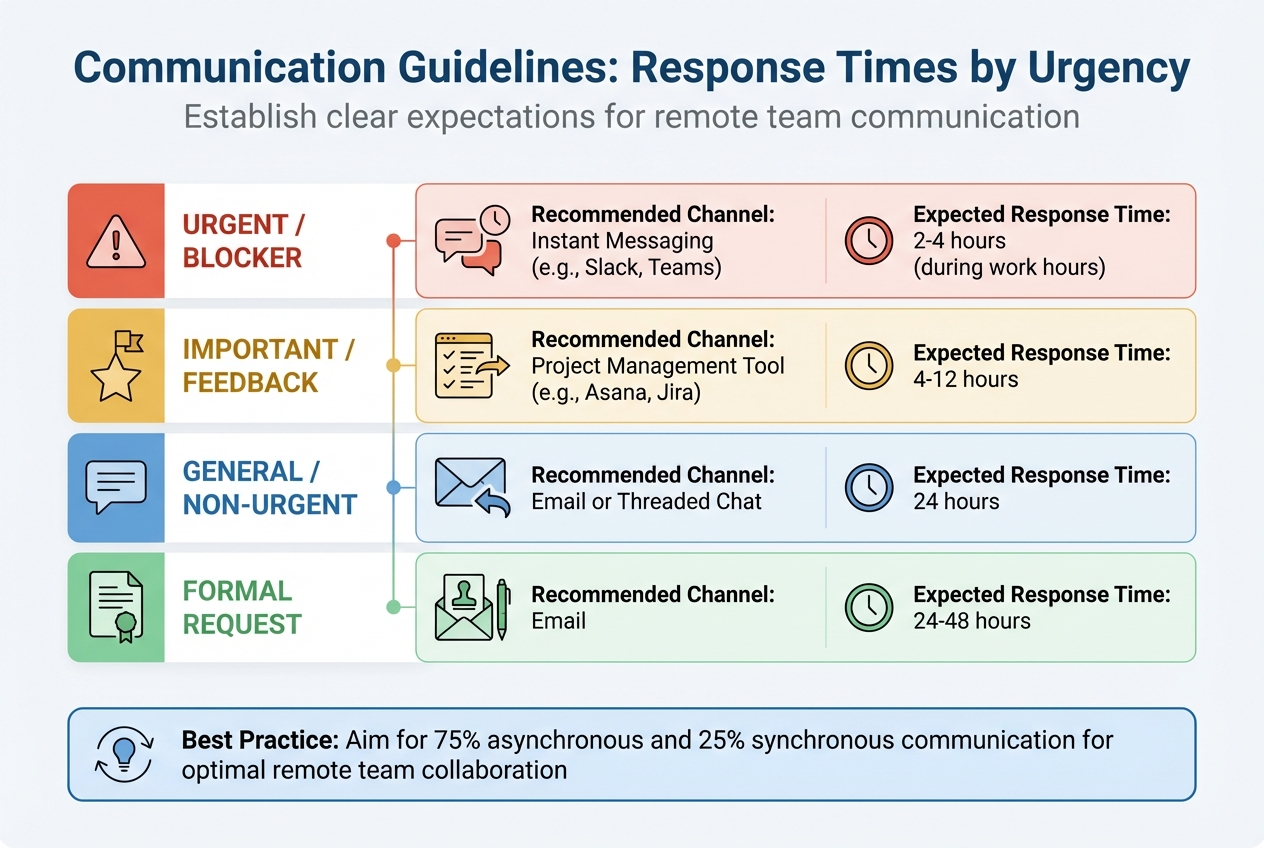
Remote Team Communication Guidelines: Response Times and Channels by Urgency Level
When working across time zones, it’s crucial to establish clear communication practices. Without defined guidelines, teams can face unnecessary delays and frustration.
Set Standard Communication Tools and Response Times
Choose specific tools for different types of communication – instant messaging, formal emails, and task tracking – and document these in a Communication Playbook. This ensures everyone knows where and how to communicate effectively. This clarity is one of the benefits of offshore staffing when scaling global operations.
Next, set clear response-time expectations based on the urgency of the situation. For example:
- Urgent blockers: Respond within 2–4 hours via instant messaging during work hours.
- General updates: Reply within 24 hours using project management tools.
- Formal requests: Answer within 24–48 hours via email.
Here’s a quick reference table:
| Urgency Level | Recommended Channel | Expected Response Time |
|---|---|---|
| Urgent / Blocker | Instant Messaging (e.g., Slack, Teams) | 2–4 hours (during work hours) |
| Important / Feedback | Project Management Tool (e.g., Asana, Jira) | 4–12 hours |
| General / Non-Urgent | Email or Threaded Chat | 24 hours |
| Formal Request | 24–48 hours |
For example, Arc streamlined task updates by using Slack emoji reactions to indicate status, cutting down on unnecessary follow-ups.
To complement these real-time practices, integrate asynchronous communication methods to accommodate team members in different time zones.
Use Asynchronous Communication Protocols
High-functioning remote teams often aim for a balance of 75% asynchronous and 25% synchronous communication. This means prioritizing tools like recorded videos, threaded messages, and detailed documentation over live meetings. Platforms such as Loom, Vidyard, and PingPong make it easy to record screen walkthroughs that teammates can view at their convenience.
Take Help Scout, for instance. Their design team, spread across five time zones, uses Loom and Soapbox to record daily video updates. Similarly, GitLab, with employees in over 65 countries, relies on a public handbook exceeding 2,000 pages. This allows team members to find the information they need without waiting for a response.
For effective asynchronous communication, make sure your messages are context-rich. Always explain the “why”, provide links to relevant documents, and clearly outline next steps.
Respect Work-Life Boundaries
Establishing boundaries for after-hours communication is essential. Use “do-not-disturb” settings to reinforce end-of-day limits, and encourage leaders to model this behavior.
Tools like Slack, Gmail, and Outlook offer “schedule send” features to ensure messages are delivered during a recipient’s local working hours. Additionally, adopting a handover culture – where teams share end-of-day summaries – can help colleagues in other time zones stay updated on progress, blockers, and pending questions.
“Asynchronous work is a simple concept: Do as much as you can with what you have, document everything, transfer ownership of the project to the next person, then start working on something else.”
- Preston W., Remote Blog
Checklist for Scheduling Meetings Across Time Zones
Balancing real-time collaboration while respecting fairness and flexibility is crucial when working with teams spread across the globe. These strategies help ensure everyone gets the most out of shared collaboration time, supporting productivity across time zones.
Focus on Overlap Hours
Finding shared working hours is essential. Aim for a daily 2-4 hour overlap to handle tasks that require real-time interaction, such as stand-ups, brainstorming, or urgent problem-solving. Research shows that teams with at least three hours of overlap report 22% higher productivity and engagement.
Use tools like World Time Buddy or Every Time Zone to quickly identify these overlapping windows. During these hours, prioritize high-value activities like decision-making and ensure deadlines are clear, specifying both time and time zone (e.g., “5:00 PM EST”). To wrap up, consider dedicating the last 30 minutes of overlap to a handover briefing. This helps address any uncertainties and ensures smooth transitions.
Rotate Meeting Times
To avoid burdening the same group repeatedly, rotate meeting times. This approach spreads the inconvenience across team members in different regions, showing respect for everyone’s time and work-life balance.
“When scheduling (these) meetings, it’s important to respect everyone’s time zones and working hours. I’d never want one of my overseas team members to have to log on ridiculously late at night”.
- Gareth Hoyle, Managing Director at Marketing Signals
Rotating schedules also builds empathy, helping team members appreciate the challenges their colleagues face in other parts of the world.
Provide Asynchronous Alternatives
Not everyone can attend live meetings, but that doesn’t mean they should miss out. Record meetings held during overlap hours and share transcripts or summaries using tools like Fireflies. This ensures that everyone, regardless of time zone, stays informed about discussions and decisions.
Send meeting agendas at least 24 hours in advance to give everyone time to prepare. If some team members can’t attend, assign a representative in a more convenient time zone to brief them later.
“If a team is skilled at working asynchronously, presence becomes secondary to getting work done”.
- Holloway Guide to Remote Work
Checklist for Building Engagement and Equal Treatment
Fostering engagement and fairness is essential for remote teams spread across different time zones. The goal is to create systems that make every team member feel appreciated, no matter where they are or when they log in.
Schedule Regular One-on-One Check-Ins
Hold weekly or bi-weekly one-on-one meetings to discuss well-being, career development, and any obstacles your team members might face. Using structured templates can help ensure important topics are consistently addressed. If your team spans multiple time zones, rotate meeting times so no one is always stuck with inconvenient hours.
“Make sure your managers are having regular 1:1s so that their team can have a safe space to have those important discussions about career goals, blockers, and ideas.”
Keep track of these conversations by documenting outcomes in HR systems to maintain accountability. IBM’s experience managing a globally distributed workforce across 170 countries highlights the value of this approach. By focusing on results instead of hours worked and maintaining strong individual connections, they achieved a 25% productivity boost over three years.
After addressing individual needs, focus on building team morale through recognition.
Recognize Team Contributions
Acknowledging achievements shouldn’t depend on live meeting attendance. Celebrate successes both in real-time settings like team calls and through asynchronous channels like Slack or email. This ensures that everyone, including those who can’t join live celebrations, feels valued and recognized.
“With remote work, you don’t have everyone in the office around you… the emphasis on production data is greater than ever. It also helps recognize people that are working really hard, but they’re not particularly vocal.”
- Dan Westgarth, Chief Operating Officer, Deel
Introduce peer-to-peer recognition programs where employees can highlight each other’s contributions. Consider creating a shared “win” log or knowledge base to document achievements, so team members can catch up on positive updates at their convenience. Use features like “scheduled send” to time recognition messages to align with the recipient’s local working hours, avoiding unnecessary notifications during off-hours.
For better alignment across time zones, strategic hiring can also play a role.
Use Offshore Talent for Time Zone Alignment
Another way to improve collaboration is by hiring talent in overlapping time zones. This minimizes the need for asynchronous work and encourages more real-time teamwork. For North American companies, South African professionals offer a great overlap in working hours, making it easier to schedule meetings, handle urgent tasks, and maintain team cohesion.
Talently connects North American businesses with skilled South African professionals in roles like customer success management, graphic design, marketing, and more. The platform manages the entire hiring process, from vetting candidates to handling employment contracts, benefits, and payroll. Pricing starts at $2,500 per month for full-time remote employees. This approach not only provides access to highly skilled talent but also helps reduce the challenges of asynchronous communication and late-night meetings, which can lead to burnout.
Conclusion
Managing global teams effectively starts with identifying a 2–4-hour window for real-time collaboration based on team members’ locations. Setting a default company time zone can also help clarify deadlines and reduce confusion when working across continents.
To improve communication, use tools with clear purposes, set realistic response times (like 24 hours for non-urgent messages), and embrace asynchronous practices. With 48% of remote employees facing collaboration challenges due to time zone differences, maintaining a centralized knowledge base becomes essential for keeping everyone aligned.
Fair scheduling is key – rotate meeting times so no single region consistently deals with inconvenient hours. For meetings that require live attendance, focus on shared availability and provide recordings for those unable to join.
Fostering engagement across time zones isn’t just about scheduling. Regular one-on-one check-ins, asynchronous recognition programs, and thoughtful hiring practices can strengthen team cohesion. For North American companies, partnering with Talently to hire South African talent offers excellent time zone alignment. Starting at $2,500/month, Talently handles sourcing, vetting, payroll, and benefits for roles in customer success, marketing, graphic design, and business development.
FAQs
How do I pick a default company time zone?
When setting up your team’s schedule, pick a default time zone that matches your primary operations or your clients’ locations. This helps establish clear guidelines for working hours and expectations. Defining core hours for real-time collaboration is key, especially when dealing with remote teams. To make things smoother, aim for some overlap in working hours between team members in different time zones. Offering flexible schedules can also make it easier to handle time zone differences, improving communication, meeting planning, and overall teamwork.
What should I do if there’s no overlap time?
If real-time communication isn’t an option, asynchronous communication can bridge the gap. Tools like email, recorded video updates, and project management platforms are great for keeping everyone on the same page. To make this work smoothly, set clear deadlines that specify time zones and outline communication policies. This approach helps team members stay productive while collaborating without interrupting their individual workflows.
How can I prevent burnout across time zones?
To help remote teams working across time zones avoid burnout, it’s important to establish clear boundaries. Respect team members’ offline hours and promote flexible schedules so they can maintain a healthy work-life balance. Regular check-ins are also key to keeping an eye on everyone’s well-being without being intrusive.
At the same time, steer clear of overloading the calendar with too many meetings, as this can add unnecessary stress. Instead, focus on asynchronous communication whenever possible – it allows team members to contribute at their own pace. If meetings are necessary, consider rotating the times to ensure fairness, so no one group is always stuck with inconvenient hours.
By adopting these strategies, you can create a more balanced and supportive environment for your team, no matter where they are.
Related Blog Posts
Ready to build your dream team?
Book a free consultation and get your first candidate shortlist within 48 hours.
No upfront fee • Only pay if you hire